It's Easy to stop or restart forum emails.
Method 1 - At the bottom of any email click the blue "Online Profile" link. (You must be logged in) then uncheck the box in Forum Preferences.
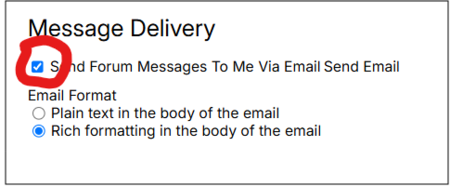
Method 2 - Log in to NaCCRA.com and click on your name in the upper right corner. Choose Profile and change your Forums setting there.
Method 3 - Click on the My Memberships button (first page of "Forums") and select forums one by one, or even suspend all of them.
Method 4 - If you can't log in, or do not wish to, email us. Request the change in an email to me or info@naccra.com
Richmond Shreve
NaCCRA Board Member & VP
Forum Moderator